Drive Sanitization
Hardware & Software
Complete, verifiable data erasure for forensic labs, enterprises and law enforcement. Choose software-based overwrite for reuse or hardware destruction for end-of-life media — with full chain-of-custody documentation.
From NIST 800-88 Clear (single-pass zero-fill) to ATA Secure Erase, NVMe Sanitize commands and degaussing, every method is matched to the media type and sensitivity level of the data.
Drishti CCTV Data Recovery
A consumer-friendly recovery tool for footage lost from DVRs, NVRs and CCTV storage.
Coming Soon
Full details and availability for Drishti CCTV Data Recovery will be published shortly. For forensic-grade CCTV recovery today, see the DRISHTI CCTV Forensic Analysis Suite.
Data Recovery Software
General-purpose file recovery for accidentally deleted, formatted or corrupted drives — for individuals and IT teams who don't need a full forensic toolchain.
Coming Soon
Full details and availability for our Data Recovery Software will be published shortly.
Choose the right method for your media
The correct sanitization method depends on media type, data sensitivity and whether the drive will be reused or retired.
Software Sanitization
Overwrite-based erasure using OS-level or firmware commands. Drive remains physically intact and can be reused. Suitable for HDDs, SSDs, NVMe and USB media.
Hardware Sanitization
Physical destruction of the media itself. Required for classified data, end-of-life drives where software erasure cannot be verified, or media with hardware faults.
Methods aligned with internationally recognised sanitization standards
Internationally recognised methods
The following standards may be applied as selectable sanitization profiles. Selection must be based on customer instruction, organisation policy, drive type, data sensitivity, and final disposition.
Roles & Responsibilities
Customer / Authorised Representative
Provides written authorization, confirms data may be permanently erased, shares internal sanitization policy, and approves exception handling where required.
Receiving Operator
Receives the device, verifies quantity and asset identity, records customer and asset details, captures photos where required, and assigns a tracking number.
Sanitization Operator
Selects the approved method, performs sanitization using approved software or hardware tools, monitors the process, records errors, and saves logs.
Verifier / Supervisor
Reviews sanitization result, checks logs and evidence, confirms whether the result is acceptable, and approves release or further action.
Reporting Authority
Generates the sanitization report and certificate, ensures mandatory fields are complete, and archives supporting evidence.
Inventory / Warehouse Team
Updates the final asset status as reusable, blank stock, reissued, e-waste, destroyed, or returned to customer.
Overwrite-based erasure
Software sanitization writes new data over every addressable location on the drive, making the original content unrecoverable. The drive remains functional and can be reissued, sold or donated. Effective for most media under NIST 800-88 Clear and Purge categories.
Single-Pass Zero Fill
Writes 0x00 to every sector. NIST SP 800-88 Clear-level for magnetic HDDs and most flash media. Fast, widely supported and sufficient for non-classified data.
Multi-Pass Overwrite
3-pass (0x00, 0xFF, random) or 7-pass DoD pattern. Each pass uses a different bit pattern to overwrite residual magnetic traces. Used in government and defence disposal workflows.
ATA Secure Erase
Issues the ATA SE or Enhanced Secure Erase (ESE) command directly to the drive firmware. Clears all user data including remapped sectors and the HPA — areas software overwrites cannot reach.
NVMe Sanitize / Format NVM
NVMe Sanitize (overwrite or block-erase) and Format NVM commands erase the entire flash including wear-levelled and over-provisioned areas inaccessible to host-side overwrites.
Cryptographic Erasure
For Self-Encrypting Drives (SEDs) — discard the media encryption key (MEK). All data becomes cryptographically unrecoverable without physical overwrite. Instantaneous for any capacity drive.
Drive Works — Sanitize Drive
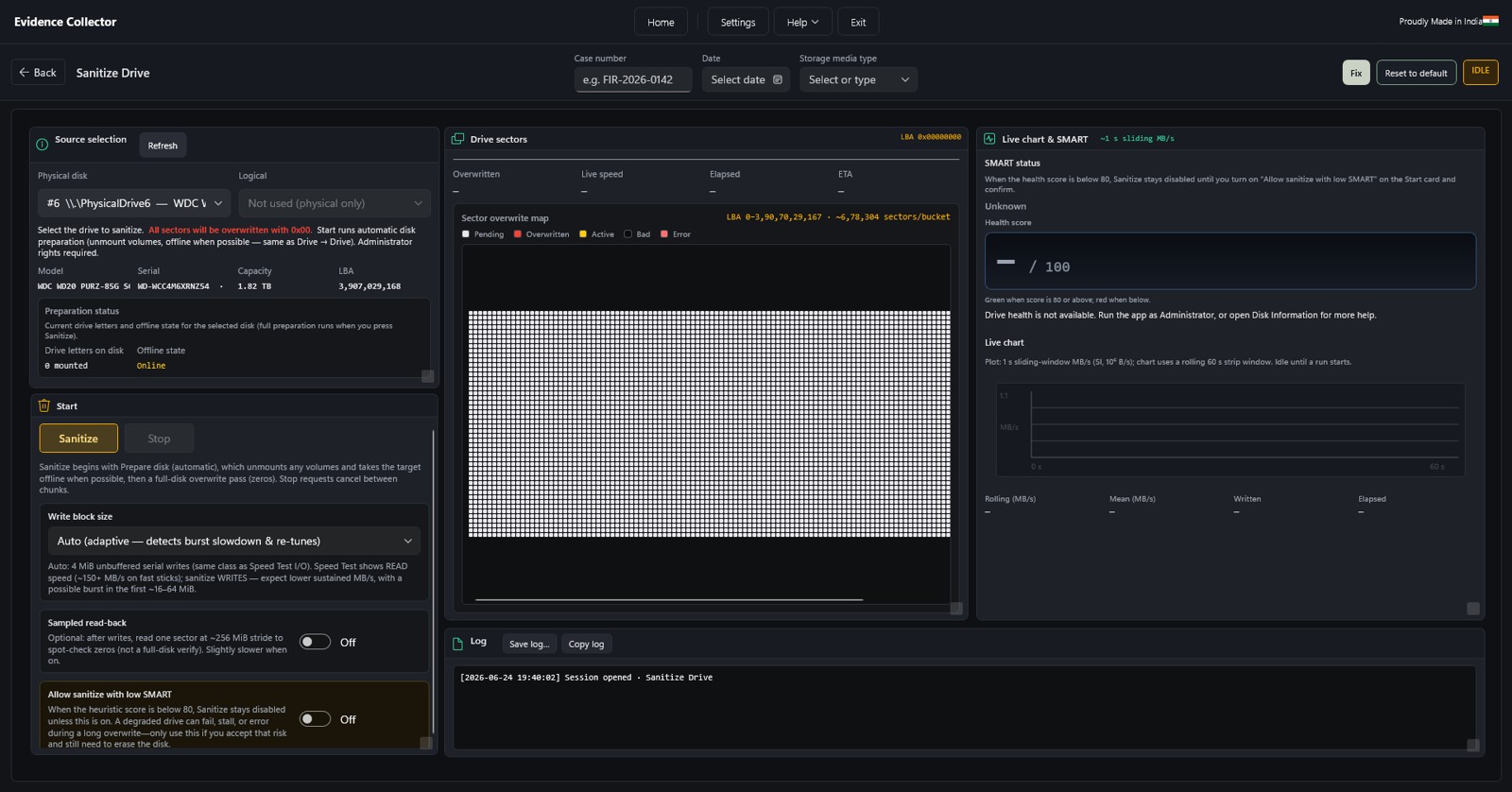
Built into Field Forensic Drive Works: full-disk zero-fill with SMART health gate, adaptive block size, sampled read-back verify and an exportable HTML session report with case metadata.
Which software method should I use?
| Media Type | Recommended Method | NIST Category | Notes |
|---|---|---|---|
| HDD (Magnetic) | Single-pass zero fill | Clear | Sufficient per NIST 800-88 for non-classified |
| HDD (Gov / DoD) | 3-pass or 7-pass overwrite | Purge | Required by some agency policies |
| SATA SSD | ATA Secure Erase (ESE preferred) | Purge | Host-side overwrite misses wear-levelled cells |
| NVMe SSD (M.2 / PCIe) | NVMe Sanitize / Format NVM | Purge | Use block-erase or crypto-erase mode |
| Self-Encrypting Drive | Cryptographic Erase | Purge | Verify SED compliance; discard MEK |
| USB Flash / SD Card | Single-pass overwrite | Clear | No Secure Erase command available; overwrite or destroy |
Physical destruction methods
When software erasure cannot be performed or verified — faulty drives, classified data, or media at end of physical life — hardware destruction provides the only forensically certain outcome. No readable particles means no recoverable data.
Degaussing
Magnetic media — HDD & tape
A powerful alternating magnetic field demagnetises the platters, permanently destroying all recorded data including the servo tracks needed to spin up the drive. Renders the HDD completely inoperable.
Destroys data on HDDs, LTO tape, floppy and magnetic media Drive is non-functional after — cannot be reused NSA/CSS-approved degaussers for classified disposal Not effective on SSDs, NVMe, USB flash or optical media
Shredding & Disintegration
All media types
Industrial shredders and disintegrators reduce drives to particles small enough that data cannot be reassembled. Particle size standards vary: NSA specifies ≤2 mm for flash media, ≤6.35 mm for HDDs.
Effective on HDDs, SSDs, NVMe, USB, optical, phones NSA EPL-listed shredders for classified media Physical evidence (weight ticket, witness sign-off) for audit Best option when drive health prevents software erasure
Drive Crushing / Punching
Hydraulic press or punch-and-bend devices permanently deform HDD platters. Faster than shredding for single units, produces auditable physical remains.
Incineration
High-temperature incineration (classified disposal facilities) reduces all media to ash. Requires licensed facility and manifest documentation; used for top-secret material.
Flash / NAND Destruction
For SSDs, USB drives and eMMC — shredding to ≤2 mm or disintegration is required since degaussing has no effect on NAND flash cells.
Sanitization workflow
A structured, documented process ensures every sanitization is reproducible, auditable and aligned with your data-destruction policy.
Identify media type & health
Record make, model, serial number, interface and SMART health score. Drives below health threshold should be flagged for hardware destruction rather than software erasure.
Classify data sensitivity
Match classification level to NIST category — Clear for internal reuse, Purge for transfer or resale, Destroy for classified or end-of-life media.
Select & execute method
Apply the appropriate software or hardware method. For software paths, dual confirmation and operator credentials are recorded before the write begins.
Verify (software paths)
Sampled read-back confirms sectors were correctly overwritten. For hardware destruction, photographic or witnessed evidence is the verification record.
Document & certify
Generate a sanitization certificate — case number, drive serial, method used, operator name, date/time and verification result. Stored as HTML report or exported for audit.
What method do I need?
NIST SP 800-88 Rev. 1 defines three tiers. Match your situation to the correct tier before selecting a method.
Reuse within your organisation
Logical overwrite protects against standard retrieval techniques. Drive is reissued internally.
Single-pass zero fill (HDD) Software overwrite (USB/SD)
Transfer, resale or donation
Protects against laboratory-grade recovery. Drive may leave your custody.
ATA Secure Erase / ESE (SATA) NVMe Sanitize (NVMe) Crypto Erase (SED) Degauss (HDD / tape)
Classified / end-of-life media
Physical destruction when software erasure cannot be performed or is insufficient for the data classification level.
Shredding / disintegration Crushing / punching Incineration (licensed facility) Degauss + shred (classified HDD)
Data Destruction vs Hard Drive Wiping
Both protect sensitive information, but serve different operational needs. The right choice depends on the drive condition, data sensitivity, reuse requirement, and compliance obligations.
| Attribute | Data Destruction | Hard Drive Wiping |
|---|---|---|
| Method | Physically damages, dismantles, shreds, crushes, degausses, or destroys the storage device structure. | Uses approved software or hardware-based erasure methods to securely overwrite, purge, or erase data. |
| Security | Highly secure when correctly performed; depends on destruction method, completeness, and evidence maintained. | Highly secure when using recognised standards, drive commands, verification, and proper reporting. |
| Reuse | Drive cannot be reused once destroyed. | Drive can be reused, reissued, or stored as blank stock if it passes sanitization and health checks. |
| Environmental Impact | Generates more e-waste — device permanently destroyed. | Less e-waste — working drives safely repurposed or reused. |
| Best Application | Damaged, failed, locked, highly sensitive, non-detecting, or unusable drives. | Working drives before reuse, reissue, resale, return, or inventory storage. |
| Efficiency | Manual, one-by-one handling for physical destruction. | Scalable batch wiping with software or hardware systems. |
Digital Personal Data Protection Act, 2023
India's DPDP Act establishes a legal framework for processing digital personal data in a manner that protects individuals while allowing lawful processing for legitimate purposes. Storage devices may contain digital personal data of employees, customers, vendors, patients, students, or citizens — making secure erasure a critical compliance control.
Drive sanitization supports DPDP compliance because retired or reused devices can contain personal data even after files are deleted, systems are formatted, or operating systems are reinstalled. A formal sanitization process prevents unauthorized access, reduces data leakage risk, and supports the organization's responsibility to apply reasonable security safeguards.
DPDP-aligned sanitization controls
Reasonable security safeguards
Use approved wiping, purge, secure erase, cryptographic erase, degaussing, or destruction methods with verification.
Purpose limitation & retention control
Sanitize drives when the original purpose for storing personal data has ended and reuse or disposal is planned.
Processor accountability
Use vendors, service providers, or disposal partners only under approved authorization and documented controls.
Breach prevention & incident response
Escalate missing drives, wrong-drive processing, failed wipes, unauthorized access, or suspected data exposure immediately.
Evidence & accountability
Maintain logs, certificates, chain-of-custody records, approvals, and exception records for regulatory reviews.
Every asset gets a clear outcome
Result categories must be used consistently so that every sanitized asset has an auditable, unambiguous status.
Passed
Sanitization completed and verification was successful.
Failed
Sanitization could not be completed or verification failed.
Partially Sanitized
Some processing occurred, but complete sanitization could not be confirmed.
Not Detected
Drive could not be detected by approved tools.
Sent for Destruction
Drive moved to physical destruction due to policy, failure, or technical limitation.
Quarantined
Drive held pending customer approval, investigation, or exception resolution.
Frequently Asked Questions
What is drive sanitization?
The controlled process of removing data from a storage device so that the data cannot be recovered using normal or reasonable recovery methods. It is stronger than simple deletion or formatting because it follows a defined method, records evidence, and verifies the result.
Is formatting a drive enough before reuse or disposal?
No. Formatting may remove file references, but data can still remain recoverable in many cases. A sanitization process uses approved erase, overwrite, purge, cryptographic erase, degaussing, or destruction methods depending on the drive type and security requirement.
When should a drive be sanitized?
Before reuse, reissue to another user, return to vendor, warranty replacement, resale, recycling, e-waste disposal, physical destruction, customer handover, or transfer outside the original department or organisation.
Are HDDs and SSDs sanitized the same way?
Not always. HDDs may be sanitized using overwrite or secure erase. SSDs and flash media may require secure erase, enhanced secure erase, cryptographic erase, or manufacturer-supported purge commands — because wear-levelling and over-provisioned areas may affect simple overwrite methods.
What happens if a drive has bad sectors or cannot be detected?
The drive must be recorded as an exception. The issue, attempted method, error message, and recommended action must be documented. The customer must approve the next step — which may include retry, quarantine, degaussing, or physical destruction.
Why is verification required after sanitization?
Verification confirms that the selected sanitization process completed successfully and that the drive identity matches the asset record. It reduces the risk of false completion, wrong-drive processing, incomplete erasure, or certificate mismatch.
What should a sanitization certificate include?
Certificate number, customer name, organisation name, asset number, drive serial number, model, capacity, method used, tool details, start/end time, verification result, final disposition, operator name, verifier name, and authorised signature.
How does the DPDP Act relate to drive sanitization?
The DPDP Act requires organisations handling digital personal data to protect it through reasonable safeguards and avoid unnecessary retention. Drive sanitization helps remove personal data from retired, reused, repaired, recycled, or disposed storage devices and reduces the risk of unauthorised access or personal data breach.
Built for defensible results
Tamper-evident HTML reports
Each sanitization session generates an HTML report with drive identity, case metadata, operator ID, method, timestamps and verification result.
Dual confirmation guards
Two-step confirmation before any destructive write. Destination drive must be explicitly selected and confirmed — colour-coded warnings make the risk level unmissable.
SMART health gate
Sanitization is blocked on drives scoring below 80 on SMART health — prompting hardware destruction instead of an incomplete software wipe.
Sampled read-back verify
Optional pass after overwrite reads random sectors to confirm 0x00 data. Results logged alongside the sanitization record.
Write-blocker awareness
Software write-protection can be armed on source ports before connecting evidence — prevents accidental writes to media under examination.
Case & custody fields
Case number, evidence date, storage media type and operator name are recorded in every session report — ready for chain-of-custody handoff.
Ready to sanitize with confidence?
Whether you need a software tool for lab-scale erasure or guidance on hardware destruction for classified media, our team can help you build a documented, compliant workflow.